



Page 3 of 4
Conducting the sociometric survey
Sociometric testing of a group is carried out in the usual way using standard paper sociometric forms. These forms can be generated automatically in SociometryPro and printed.
To create sociometric forms:
- Select the sociometric study node in SociometryPro.

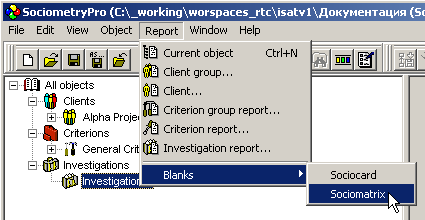
- Create a sociometric card form using the main menu “Report -> Forms -> Sociometric Card”. Specify the name of the report file in which the form will be saved.

- Create a sociomatrix form using the main menu “Report -> Forms -> Sociomatrix”. Specify the name of the report file in which the form will be saved.
PS:
During sociometric testing, give each participant a printed sociometric card form to complete.
The printed sociomatrix form serves as a supporting document for the consultant and can be used for initial processing of the results when a computer with SociometryPro is not available. These data can later be transferred to the program's choices table during the next stage, when analyzing the sociometric survey results.